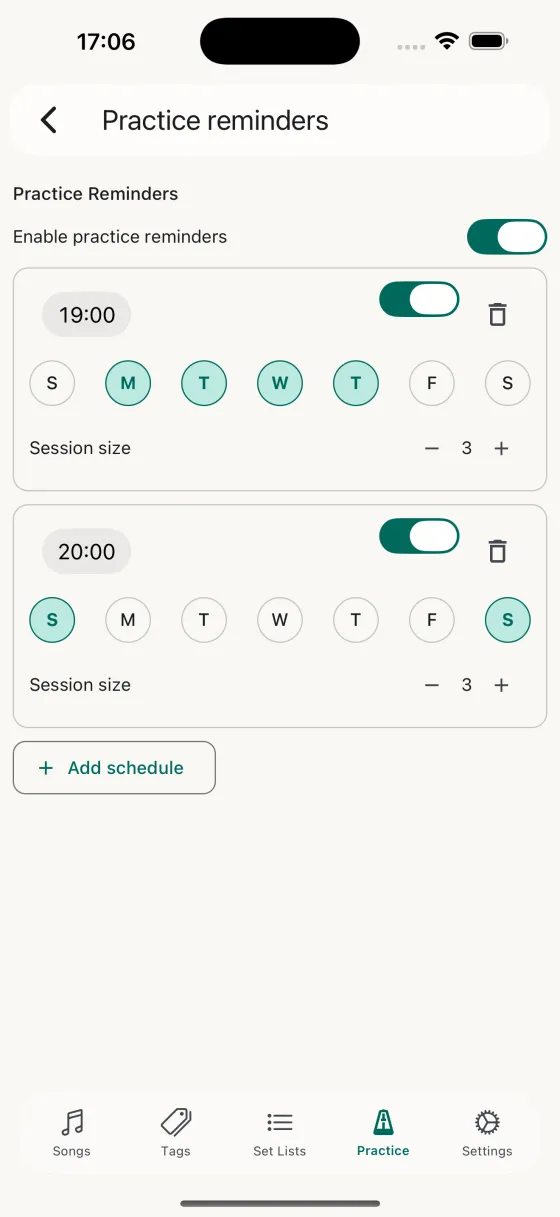
More than one schedule
A single "one time a day" reminder isn't how real life works. Song Hive lets you create as many schedules as you want — a 20-minute warm-up at 8am on weekdays, a longer session at 7pm on Tuesday and Thursday, a weekend reset on Saturday mornings. Each schedule has its own time, its own days of the week, and its own session size.
Per-day toggles
Every schedule has seven pills — S M T W T F S — one for each day of the week. Tap any pill to turn the schedule on or off for that day. No more fiddling with "every weekday except Wednesday" logic; you see the week at a glance and tap the days that matter.
Per-schedule session size
Set a different session size for each schedule. Your weekday warm-up might be 5 songs; your weekend deep-dive might be 15. When a reminder fires and you tap it, Song Hive opens a full-screen practice session sized to the schedule that triggered it.
Tap to start, not a chore
When a reminder fires, the notification tells you how many songs are due. Tap it and you land directly inside a practice session — no opening the app, finding the Practice tab, or deciding what to play. The decision's already made for you. You just play.
Turn it off without losing the setup
Going away for a week? Toggle the master switch off and all reminders pause — but every schedule you built stays exactly as you left it. Toggle it back on when you're ready, and you're back in rhythm with zero reconfiguration.
Never miss a practice day
Set up your schedules once, play every day.