Song Hive
Your personal music library and practice companion

Your personal music library and practice companion
A clean, focused interface built for musicians
Song Hive flexes to fit how you play. Pick the closest match.
Casual strummer who might sing a bit. A dozen songs you half-know, always ready to pick up.
See how it fits →Learning your first songs. Easy to keep, easy to come back to.
See how it fits →One guitar, a mic, and a rotating set you can pull off on demand.
See how it fits →Just the words, big enough to read from the mic stand.
See how it fits →Tight set, shared with the band, tuned and ready before the count-in.
See how it fits →Build a set list in seconds — pick songs from your library, drag to reorder, and choose whether each song shows chords, lyrics, or notes. Tap Perform to launch a full-screen, distraction-free view that swipes between songs in order, with a running position counter so you always know what's next.
Pinch-to-zoom font sizing and auto-scroll speed are remembered per song, so every number opens exactly how you left it. Share an entire set list with a bandmate over AirDrop or iMessage — Song Hive intelligently merges the songs into their library on import.
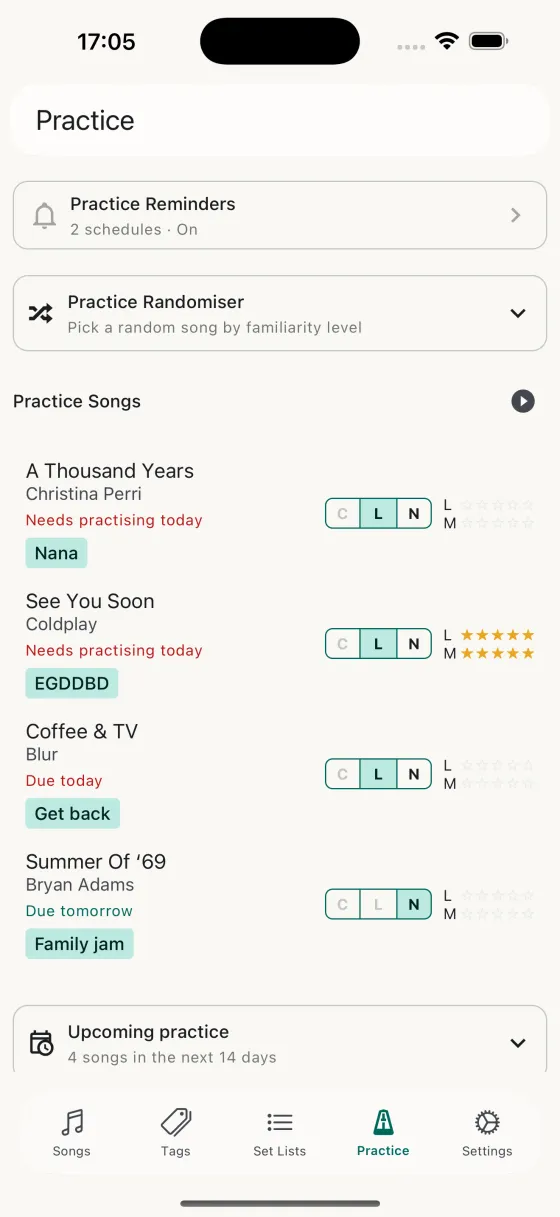
Enable practice on a song and Song Hive schedules it using spaced repetition — songs you know less well come back more often, songs you've nailed come back less often to keep them fresh. The Practice tab shows you exactly what's due, when, and why.
Set up daily reminders with per-day schedules and your preferred session size. Hit Start practice session to jump straight into a full-screen player that sweeps through the songs for you — rate each one when you're done, and tomorrow's list updates automatically. A forecast calendar shows you the weeks ahead so practice never catches you by surprise.
Found a song you want to learn? Search for chords and tabs right inside Song Hive — no switching apps, no copy-pasting. Browse results with ratings so you always get the best version, then import directly into your song with one tap.
It's the fastest way to go from "I want to learn that" to playing along.
Open any lyrics, chords, or notes in full-screen mode and let auto-scroll do the page-turning. Adjust the speed from 0.25x to 4x to match your tempo — scroll manually any time and it picks back up where you left off.
Even better: when LRCLIB has timed lyrics for the song, auto-scroll locks to the song itself — each line hits the page midpoint exactly when it's sung, with the chord sheet scrolling in step. No speed guess, no drift. Learn more about Synced Auto-Scroll →
Pair it with pinch-to-zoom font sizing and the "Keep Screen Awake" setting for a true teleprompter experience on stage or at rehearsal.
Built around how musicians actually learn and remember songs
Store lyrics, chords, and personal notes for every song in your repertoire.
Learn more →Track how well you know the lyrics and music separately for each song.
Learn more →Spaced-repetition scheduling, a randomiser by level, sessions that sweep through everything due today, and a practice log.
Learn more →Full-screen view with auto-scroll and pinch-to-zoom font sizing for hands-free playing.
Learn more →Auto-scroll locked to the song's own timing — each lyric line at the midpoint when it's sung, chords scrolling in step.
Learn more →Structured tuning and capo on every song, auto-detected on import, with a mic-based tuner on the Perform screen.
Learn more →Drag to reorder, pick per-song fields, perform full-screen, and AirDrop the whole set to your bandmates.
Learn more →Open a set list straight into Perform, or see what's due today and start practising, right from your Home Screen.
Learn more →Your library stays in sync across all your Apple devices automatically.
Learn more →Back up your entire library and restore it whenever you need to — or bring one across from BandHelper.
Learn more →Schedule daily nudges with per-day toggles and per-schedule session sizes. Tap the notification, start playing.
Learn more →Available in English, Italian, German, Spanish, French, Japanese, Simplified Chinese, and Brazilian Portuguese.
Learn more →A detailed tour of the app — every button, every swipe, every shortcut
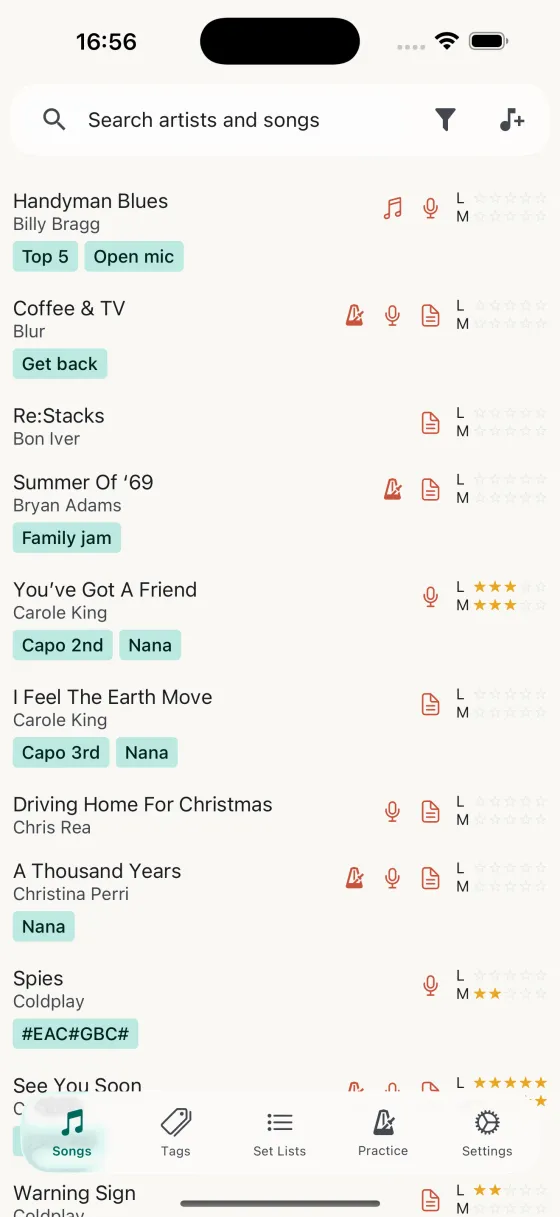
Your entire library, sortable and searchable, with swipe actions for practice and delete.
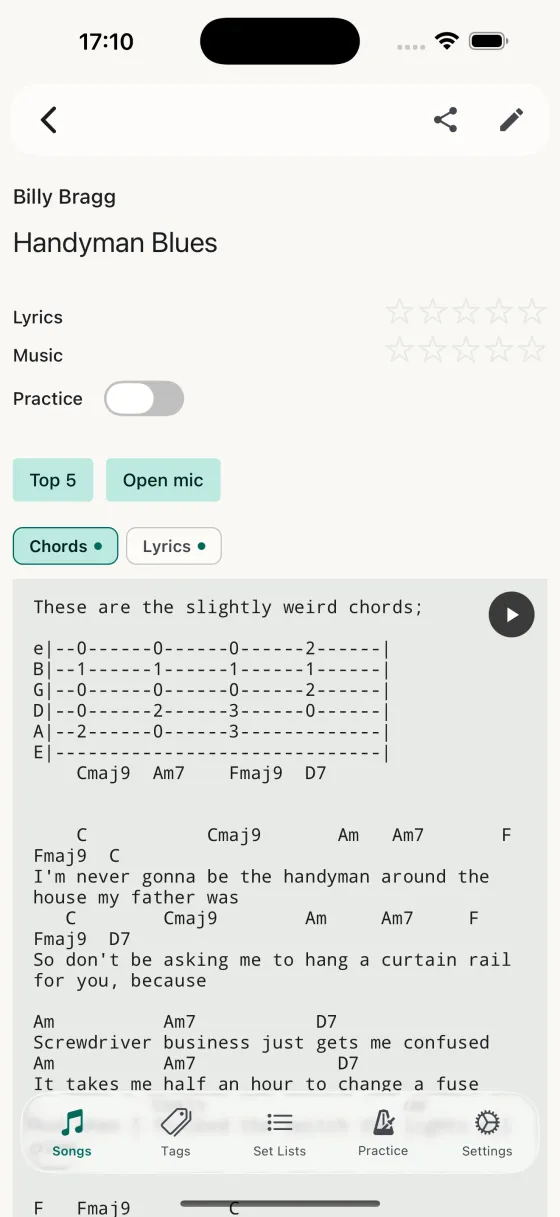
Tabs for chords, lyrics, and notes. Pinch-to-zoom font, auto-scroll, version history.
Today's practice list, randomiser, forecast calendar, and session launcher.
Schedule daily nudges with per-day toggles and per-schedule session size.
Every practice session you've logged, grouped by day.
All your set lists at a glance. Swipe to delete.
Drag to reorder, pick per-song fields, launch Perform or Practice mode.
Full-screen distraction-free view with pinch-to-zoom and auto-scroll.
Browse every tag, jump to the songs that use it, manage tag membership.
Theme, screen awake, song defaults, import/export, iCloud sync log.
Default font size, auto-scroll speed, practice session size, and field order.
Pick which sections to back up and choose merge or overwrite on import.
Every iCloud sync operation with what was pulled, pushed, or skipped.
Three simple steps to better practice
Build your personal catalog with lyrics, chords, and notes.
Honestly assess how well you know each song's lyrics and music.
Song Hive schedules the songs that need the most attention.
Quick answers to the things people ask most
Song Hive is free to download and use. You can add your first handful of songs with no payment, which is enough to see whether the app fits your practice routine.
A one-time in-app purchase unlocks an unlimited library. There's no subscription, no ads, and no recurring charges.
Song Hive is an iOS app. It runs on iPhone and iPad, and syncs through iCloud so your library is available on every Apple device signed in to the same Apple ID.
There's no Android or web version right now.
Yes — your entire library syncs through iCloud automatically. Add a song on your iPhone at rehearsal and it's waiting on your iPad at home. Edits, set lists, tags, familiarity ratings, and practice history all sync.
Sync uses your own iCloud account, so nothing goes through our servers. The Sync Log in Settings shows exactly what's been pulled, pushed, or skipped on every sync.
You rate each song's familiarity for lyrics and music on a 0–5 scale. Song Hive uses a spaced-repetition schedule — songs you know less well come up more often, and songs you know cold come up less often to keep them fresh.
After each practice session you re-rate the song, and the schedule adjusts from there. There's also a Practice Randomiser if you just want to pick a song by familiarity level without following the schedule.
Yes. Inside the song editor, the Chords tab has a chord search that pulls results with ratings so you can pick the best version and import it into your song with one tap. The Lyrics tab can pull from LRCLIB and online lyrics sources in the same way — or import your own lyric sheet from a Word document, PDF or text file, verse breaks intact.
You can also paste content directly, or type your own — Song Hive doesn't require any source.
A set list is a custom-ordered collection of songs for a specific gig, rehearsal, or jam. Drag to reorder, pick whether each song shows chords, lyrics, or notes, then tap Perform to get a full-screen, distraction-free view that swipes between songs in the order you chose.
The same song can live in as many set lists as you like — your library stays clean, your sets stay specific.
Yes. Tap the share button on any set list and send it over AirDrop, iMessage, email — anywhere iOS's share sheet reaches. The file bundles every song in the set along with the content you shared (chords, lyrics, or notes), plus the order and field selections.
When a bandmate opens the file, Song Hive merges it into their library: new songs are added, songs they already have get extra content filled in without overwriting anything they've written. A summary shows exactly what changed.
Yes. Auto-scroll speed (0.25x to 4x) and pinch-to-zoom font size are both remembered per song, so ballads scroll slow and up-tempo numbers scroll fast — automatically, every time you open the song.
Yes. Settings → Import / Export exports a single JSON file containing your entire library — songs, tags, familiarity ratings, set lists, and practice history. Save it to Files, email it to yourself, or drop it in Dropbox.
Import reads the same JSON format, so you can restore a backup or move a library between iCloud accounts.
Yes. Song Hive stores everything in your own iCloud — we don't run any servers, collect analytics, or see your songs. See the Privacy Policy for the full story.
Head to the Support page — there's an email address there and we read every message.
Start building your song library today — it's free to get started.