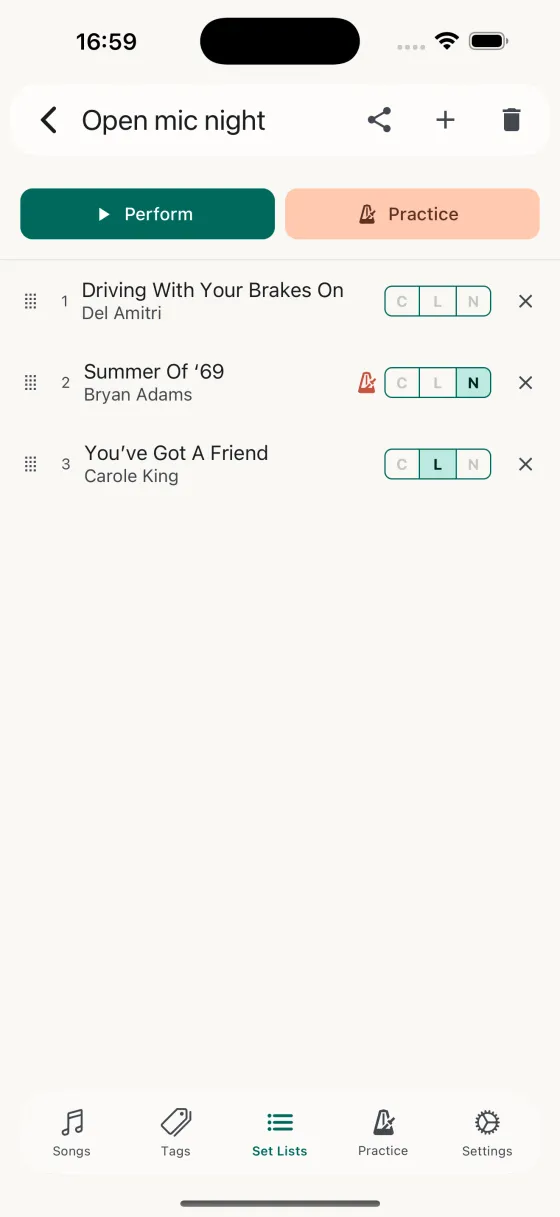
Build a set in seconds
Create a new set list, give it a name, and start adding songs. A searchable picker shows only songs that aren't already in the set, so you never add the same one twice. Drag a song by its handle to reorder, and choose whether each one shows chords, lyrics, or notes — tap the field chip to cycle through whatever that song has available.
The same song can live in as many set lists as you like. Build one for a pub gig, another for a quiet acoustic set, another for wedding requests — your library stays clean, your sets stay specific.
Import a set list from Spotify
From the Set Lists tab, tap the + menu and pick Import from Spotify. Paste a public Spotify playlist or album URL, and Song Hive pulls every track — name, artist, and all — into a new set list. Songs you already have are matched so they aren't duplicated; new songs are added to your library. It's the fastest way to turn a Spotify practice mix into a rehearsal-ready set.
Swipe-action shortcuts
On the set list detail screen, each song row is a swipe target:
- Swipe leftRemove from set list — takes the song out of this set without deleting it from your library.
- Swipe rightToggle practice on/off — if you're rehearsing this gig, flip practice on across the whole set in one pass.
- Long-press dragReorder the set. The row lifts visually, and the counter updates live as you drop.
Perform Mode: eyes up, hands on the instrument
Tap Perform on any set list to launch a full-screen, distraction-free view. Swipe sideways — or use the arrow buttons — to move between songs in order, with a running "3 / 12" counter so you always know where you are in the set. The next song is one gesture away; there's no song picker, no menus, no context switching.
Each song opens to the field you chose when you added it — chords, lyrics, or notes — and every display setting is remembered per song. Pinch to zoom font size from 8pt to 40pt, and Song Hive saves it so that song always opens exactly how you left it. Start auto-scroll with a tap and tune the speed with a slider; that speed is saved per song too, so your ballads scroll slow and your up-tempo numbers scroll fast, automatically.
Practice mode: rehearse the whole gig
Set lists also launch in Practice mode — tap the metronome button at the top of the set list. Same full-screen player, but now each song has a star icon floating in the corner. Tap it, rate your Lyrics and Music familiarity, and Song Hive logs the practice and updates the schedule for that song. Perfect for rehearsing a gig end-to-end the week before: you're playing the set in order, and your practice data stays in sync with reality.
Share a whole set with your band
Tap the share button and send the set list as a .songhive file over AirDrop, iMessage, email — anywhere iOS's share sheet reaches. The file bundles every song in the set along with the content you shared (chords, lyrics, or notes), plus the order and field selections.
When a bandmate opens the file, Song Hive intelligently merges it into their library. New songs are added. Songs they already have get the extra content filled in without overwriting anything they've written themselves. They see a summary — "2 new songs added, 1 song updated" — so there's no guessing what changed.
Synced across your devices
Every set list, every song, every reorder syncs through iCloud to the rest of your Apple devices. Build a set on your iPad at home, and it's waiting on your iPhone at soundcheck. Delete a set on one device and it disappears everywhere.