Spaced repetition, built for musicians
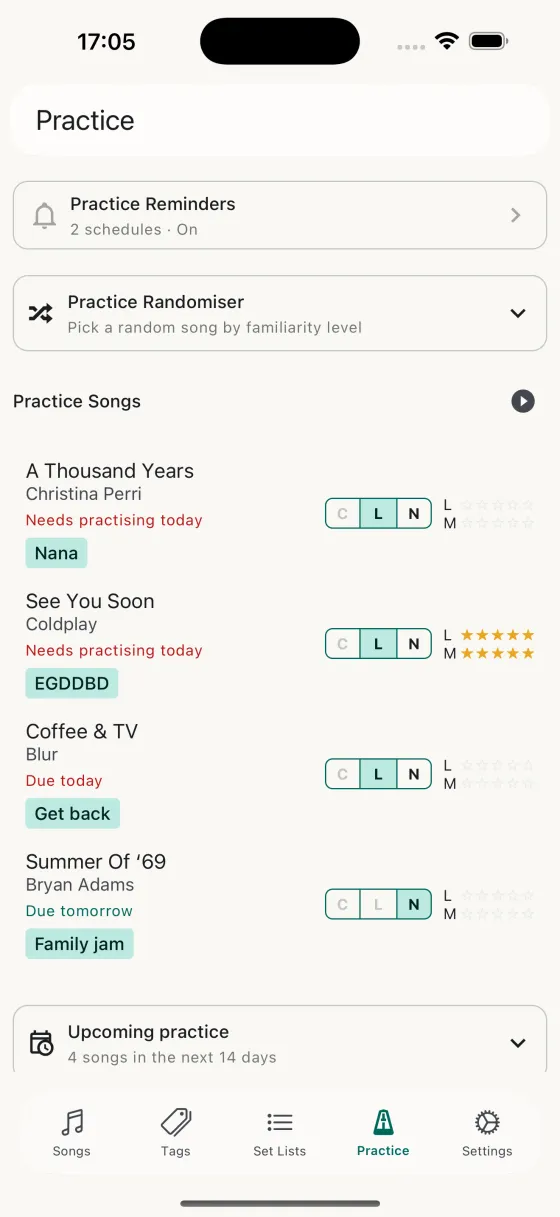
Rate each song's familiarity for Lyrics and Music separately on a 0–5 scale. Song Hive schedules songs you know less well to come back more often, while songs you know cold get longer intervals that just keep them fresh. It's the same technique that works for language learners — adapted for how musicians actually learn and forget.
Every time you finish a song in a practice session you re-rate it. Tomorrow's list re-plans itself from those numbers. You never have to decide what to work on; you just open the app and play.
Practice an extra time within a recall cycle and the schedule doesn't penalise you with longer intervals — Song Hive folds the extra session into the current cycle instead of treating it as another rep. And if a mid-cycle session shows you've slipped, the cycle resets so the song comes back sooner.
Practice sessions that play themselves
Tap Start practice session on the Practice tab and Song Hive picks the songs that are due, fills in extras from your wider library to hit your preferred session size, and launches a full-screen player. Swipe between songs with a counter keeping you oriented — "3 / 8" — and rate each song when you're done with a tap on the star button.
The session opens each song to its chosen practice field (Chords, Lyrics, or Notes) at the font size and auto-scroll speed you last used. No more flicking between menus mid-practice — just play, rate, swipe, repeat.
The Practice Randomiser
Not in a mood for the schedule? The Practice Randomiser picks a song at a familiarity level you choose. 0 is "surprise me with something I barely know" — great for learning something new. 5 is "give me something I love to play" — great for warming up or enjoying a quick win. Anywhere in between gives you a focused session on songs at that level.
The forecast calendar
Scroll down on the Practice tab for a monthly forecast calendar that shows exactly when each song is next due. Tap a date to see what's scheduled, tap a song in the list to open it. You can see the weeks ahead at a glance, so your practice never catches you by surprise — and you can tell at a glance when the schedule thins out.
The practice log
Every song you complete in a session is logged with a timestamp, grouped by day. Open the Practice log from the Practice tab to scroll through your history — see what you worked on last Thursday, spot streaks, revisit a song you haven't touched in a while with one tap.
A chart for every song's history
Each song with practice enabled shows a timeline chart in its editor — Lyrics and Music dots laid out from the day you first enabled practice through to today. It's an at-a-glance view of how often you've played the song and how your ratings have moved. Because the chart anchors to the day you started practising the song (not the day you added it to the library), an old song that only recently entered rotation still reads cleanly instead of being scrunched against the right edge.
Forgot to log a session? Back-date it
The practice-rating modal has a date picker. Pick yesterday if you rehearsed last night but only remembered this morning; pick last Thursday if you're logging a week of sessions in one go. If you go further back than the chart starts, Song Hive rolls the chart's anchor date back to match, so the new session lands on the timeline instead of disappearing off the left edge.
Turning practice on and off
Not every song needs to be in rotation. Toggle practice on or off for any song from the song list or from the song editor. Songs with practice enabled appear on the Practice tab, contribute to sessions, and show up on the forecast. Songs with practice off stay in your library for reference and set lists but stay out of the rotation.
Practice what matters, every day
Let Song Hive pick the next song. You just play.