Practice Reminders
Master toggle
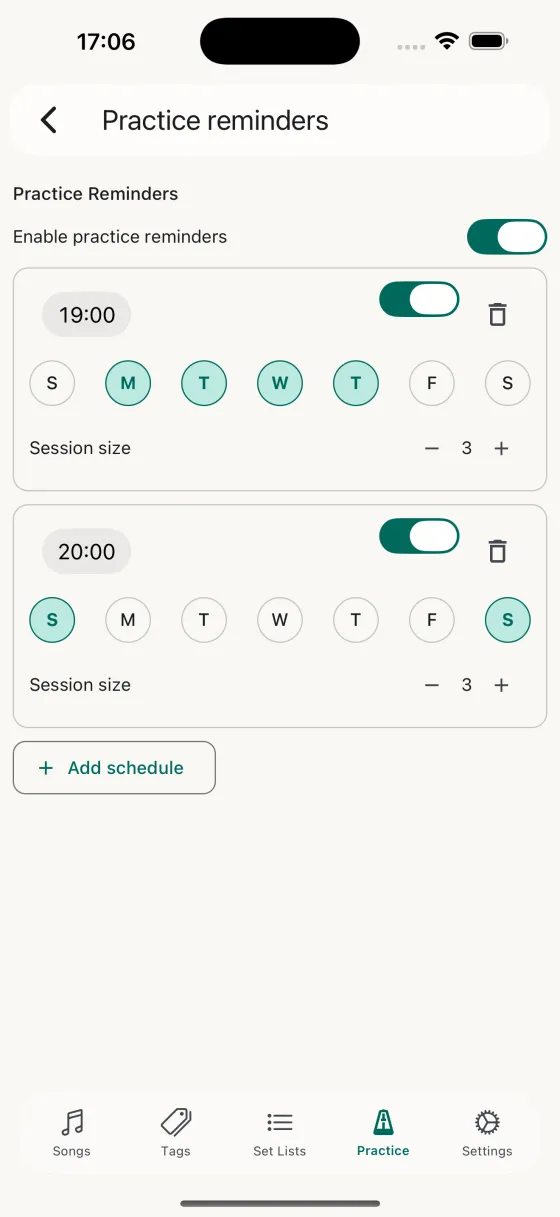
The Enable practice reminders switch at the top is the on/off for everything. Turn it off when you're travelling and flip it back on when you're home — every schedule stays intact.
Schedules
Each schedule is a card with three rows:
- TimeTap to open the native iOS time picker. Set exactly when the notification fires.
- Days of weekSeven pills — S M T W T F S — tap each one to toggle the schedule on or off for that day.
- Session sizeMinus / plus buttons set how many songs the practice session launched from this reminder should contain. Range: 3–20 songs.
Each schedule has its own enabled/disabled switch and a trash icon to delete it outright.
Adding a schedule
The + Add schedule button at the bottom creates a new schedule pre-filled with sensible defaults — your default practice session size, today's weekday selected, a mid-morning time. Edit it from there.
How it feels in use
When a reminder fires on your lock screen, the notification tells you how many songs are due. Tap it and you land directly inside a full-screen practice session — no opening the app, no deciding what to play. The scheduler's already picked; you just play.