Song Defaults
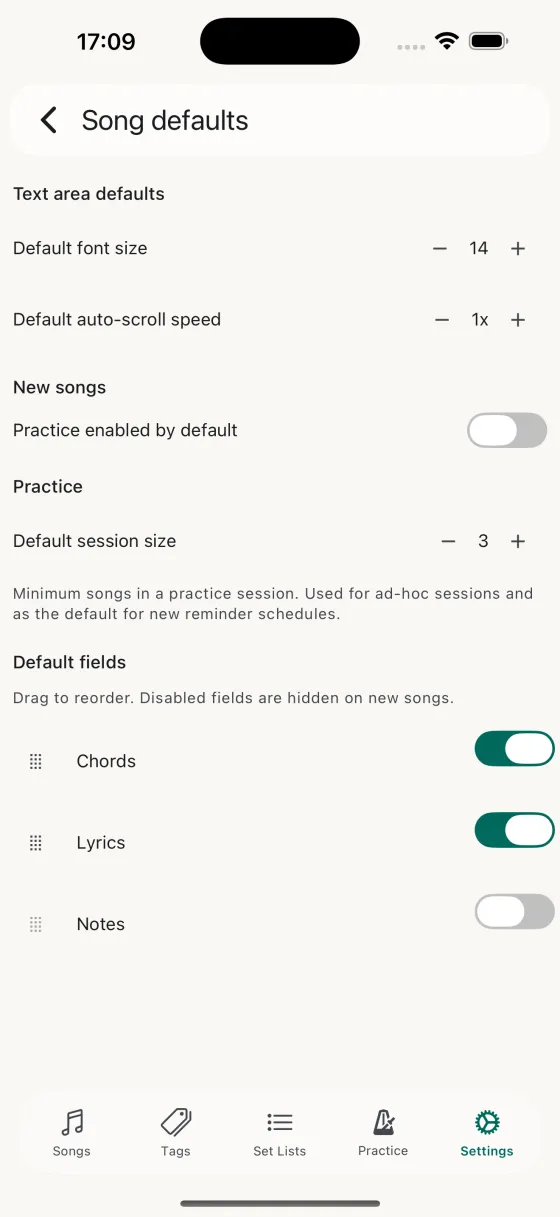
Text area defaults
- Default font sizeStepper from 8 to 40. The size a song opens at the first time you view it, before you pinch-to-zoom.
- Default scroll speedStepper from 0.25x to 4x in 0.25 increments. The speed a song starts at when you first tap play.
New songs
Practice enabled by default — whether a freshly-added song lands in the practice rotation automatically, or stays out until you flip it on.
Track lyrics familiarity and Track music familiarity — whether new songs start with each familiarity axis enabled. Turn either one off to add songs without a lyrics or a music rating by default; you can still flip the toggle back on per song from the editor. Settings on this screen sync across your devices via iCloud.
Practice
Default session size — how many songs a practice session should contain if you haven't set a per-reminder size. Also used as the default for brand-new reminder schedules.
Default fields
A drag-to-reorder list of the three content tabs — Chords, Lyrics, Notes — each with an enable/disable toggle. Disabling a tab hides it on every new song (and on songs without content in that tab), so your editor is only showing what you actually use.
- DragChange the order tabs appear in the editor and in Perform mode.
- ToggleHide a tab you never use.