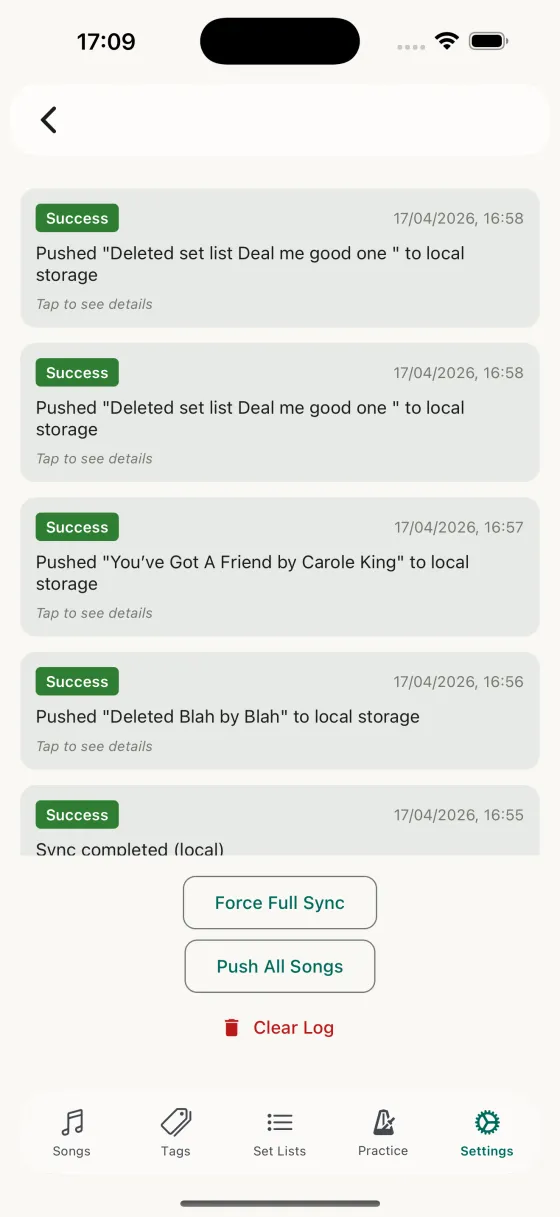
Sync Log
Why this exists
iCloud sync quietly does a lot. If something's missing, or a device seems out of date, the Sync Log is where you go to find out exactly what happened and when.
The banner at the top
A single line telling you where sync is going and when it last cleanly worked — the storage it's using, the iCloud environment this build talks to, and the time of the last run that actually saved something. If sync has been failing, the banner says so rather than showing you a list you have to interpret.
Entries
Each entry shows a status badge (Success, Error, Skipped), a timestamp, and a summary message. Tap an entry to expand it and see the details — songs pulled from iCloud, songs pushed up, local versions backed up, songs deleted, and anything iCloud refused to accept, listed with the reason it gave. A run that was rejected is recorded as an error, not a success.
If your iCloud storage is full
Sync writes into your own iCloud storage, not ours — a song library is tiny, but it still needs room in your account. If iCloud is full it refuses every upload, and the log says exactly that, with what to do about it: free up space in Settings → your name → iCloud. Nothing is lost, and nothing is abandoned — everything waiting goes up as soon as there’s space.
While there’s no room, Song Hive stops uploading automatically rather than retrying something that can’t succeed until you act. Push Everything still tries whenever you tap it, so if you’ve just cleared some space you don’t have to wait.
Actions at the bottom
All three buttons are always visible, even on a fresh install before any sync has run.
- Force Full SyncClears the sync state and runs a full sync from iCloud. If sync failed to start at launch (iCloud not ready), tapping this button retries the initialisation — if iCloud still isn’t available you’ll see a clear error rather than a false success. Use this if something has gone sideways and you want a clean re-pull.
- Push EverythingRequeues your whole library — songs, practice history and set lists — to be pushed to iCloud. Useful after restoring a backup, or if you suspect something didn’t make it up. This is also the recovery step if a device’s library never reached iCloud: only songs you’ve changed are queued for sync automatically, so an untouched library needs one deliberate upload to catch up.
- Clear LogWipes the local sync log. Doesn't affect your data — just the history view.